The short answer
- The C300 DC is a compact LiFePO4 power station with 288Wh of capacity and 300W of output, built around USB ports and a car port rather than AC outlets.
- Reviewers like its size, its pop-out light and its USB power; they mark it down for having no AC, for slow charging without 140W cables, and for the full price.
- It suits phones, tablets, laptops, camp lights and low-power gear such as a satellite internet terminal; it is the wrong tool for a fridge or a kettle at home.
You are packing for a long weekend away with two phones, a tablet, a laptop and a small internet dish, and you would rather carry one box than four separate power banks.
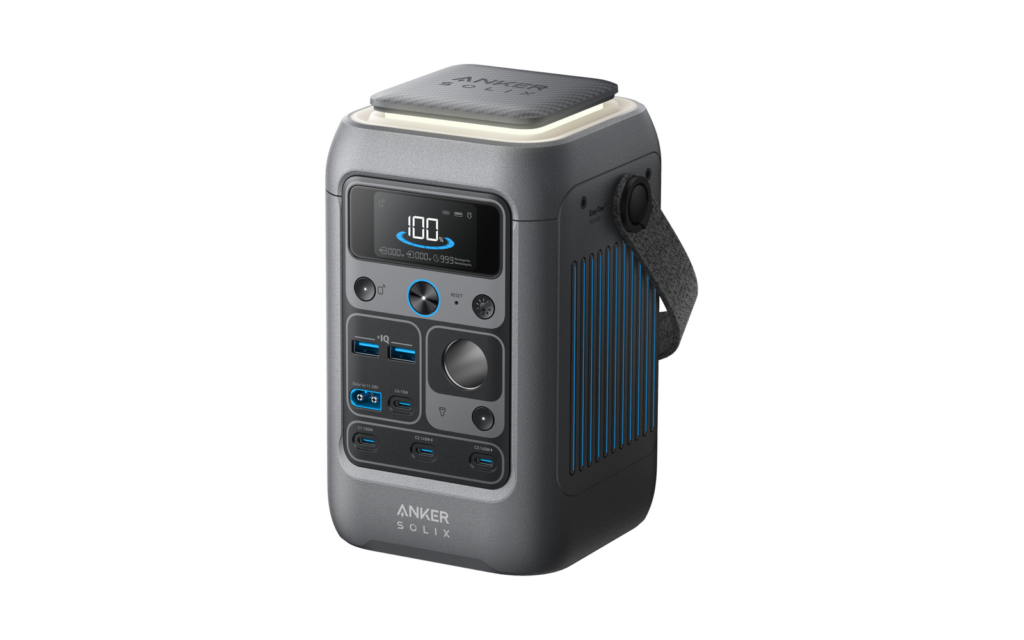
Which C300 this is
Anker sells two similar models: the C300, which has built-in AC outlets, and the C300 DC, which does not. This page covers the DC model only. Anyone who needs an outlet should look at the bigger C300 instead, as one review also advises.
Spec check. Source: Anker and its reviewers, checked August 2026
| Model | Claimed figure | What the number does not tell you |
|---|---|---|
| Capacity | 288Wh, LiFePO4 | The same cell figure appears in the maker’s spec sheet as reproduced by a reviewer. |
| Output | 300W total | Two USB-C ports are rated at 140W each, and the rest are lower. |
| Ports | 2 USB-A, 4 USB-C and a car port | One review counts 8 ports, which presumably includes the solar input. |
| Fast charging | Up to 280W through two 140W USB-C inputs | Anker says two 140W chargers are needed for full speed. |
| Solar input | Up to 100W, 11 to 28V | Anker says to use panels with an XT60 connector. |
| Weight | 2.8 kg (6.17 lb) | Small enough for a backpack; one reviewer calls it about the size of a football. |
| Warranty | 3 years | Taken from the booklet in a review unit’s box, so check the terms in your country. |
Setup and the app
Setup is short. One tester put it at about 5 minutes, not counting the first charge, and notes that the app is needed to reach all the controls. Another found no setup at all if you skip the app: long-press the center button, check the charge level and plug in.
To activate it for the first time, Anker says to charge it from a USB-C wall charger of 18W or more, using one of the two USB-C ports that accept the charge. The display then estimates the time to full or empty, capped at 100 hours.
What it runs and for how long
Runtime figures differ because the loads differ, so read them as examples rather than a ranking. One reviewer kept a laptop and a phone going for a week from one charge and still had 32 percent left. CNN Underscored plugged in a laptop and left a news stream running overnight, and the station powered it for 12 hours against 2.5 hours on the laptop’s own battery.
The Gadgeteer logged an M1 laptop over several days: the station read 46% the following day, then 21%, then 7%. The same tester ran a portable car fridge, which drew about 30W when its compressor ran, and found 23% left after twenty-four hours.
For a satellite internet terminal the picture is good. Nordic Gear Lab has used it for about a year, with over 30 days of field use, and says it will carry a Starlink Mini through at least 24 hours of normal use. With a Mini, phones, tablets and a laptop all running, the same tester expects a day to take it from 100% to about 30 to 40%.
Charging needs the right chargers
The station accepts a lot of power, but it ships with little of the means to deliver it. Bob Vila found that only one 140W USB-C cable is in the box, and there is no wall plug, while the quick route feeds both fast USB-C ports at once, which gets it to 80 percent in one hour. The same review gives about 2.5 hours from solar or a car outlet. Both use the same solar input, which is capped at 100W, and 288Wh ÷ 100W = 2.88 hours is the shortest possible time at that cap, so read the 2.5-hour figure as a best case; a real recharge will usually take longer. Without a big charger it is slow: CNN Underscored fed the unit from a 20W phone adapter and it took 18 hours to fill.
There is no AC input, and The Gadgeteer would have liked some kind of AC charging option. Solar and the car are the alternatives. One tester paired it with a 120W panel and saw around 91W in early morning light.
Whether it can be charged and used at once is where two testers disagree.
Where sources disagree
Bob Vila
It is not designed to output power while it is being charged.
Nordic Gear Lab
On solar it climbed from half to full in about 1.5 hours, with a Starlink Mini drawing power at the same time.
Our read
A third tester keeps it plugged into a charger while it feeds a wireless charging stand. The conditions differ, so treat pass-through as something to test with your own charger before you rely on it.
Ports and output limits
Power is shared out unevenly. The two fast USB-C ports are the strong ones; the smallest USB-C port and the USB-A ports are limited, and together the USB-A and the small USB-C port are held to 20W. One review notes that the car port is listed at 120W in the table but a sticker on the box says only 100W is available. Running every output at once can also max out the available current and hurt performance.
The practical rule is simple: phones, tablets and one or two laptops are fine, and a 300W load is hard to reach with USB gear alone.
Compared with small AC stations
Because it has no AC outlets, the sensible comparison is with small stations that do. A comparison table in one of the reviews lists the EcoFlow River 3 at 245Wh and the Jackery Explorer 300 at 293Wh, against 288Wh for the Anker. Those two weigh 7.8 and 7.1 pounds against its 6.17, and each has AC outlets that the Anker leaves out. So the trade is a little less weight and a built-in light for fewer plug types.
Home outages
For outages the verdict is mixed. One review says the C300 DC cannot run large appliances, which makes it less helpful for keeping a fridge going at home. Another review is more upbeat about small gadgets and says it has enough battery to keep devices alive for multiple days during an outage. The year-long tester’s heavy day, with a Starlink Mini and several devices running, took it from about 100% down to 30 to 40%, so a second day of the same load would need a recharge first.
Light, build and carrying
The light pops out of the top, and one review calls it surprisingly bright. Another review lists three brightness settings, and in the app the light draws 1, 2 or 3W depending on the setting. One reviewer left a similar-sized camp lantern at home because of it.
It has also held up in use: after about a year, the long-term tester reports it is close to new, with only light scratches.
Price and warranty
The regular price is a little under two hundred dollars, and discounts are common. One review lists $199.99 as the regular price, and says sales are more frequent than full-price offers, usually around $50 off. Another review calls it a $200 battery. The review unit’s booklet lists a three-year warranty. Because the retail price moves, check the current price and the warranty terms before you buy.
Our read
The C300 DC is a good choice for a particular kind of user: someone whose kit is USB-C devices and a few 12V items, who wants it light and in a small box. It makes more sense the more of your gear charges over USB-C, and it fits a satellite terminal well. Its weaknesses are real but narrow: no AC, a slow first charge unless you own the right chargers, and an unsettled answer on charging while in use.
Buy the C300 DC for travel, camping and low-power gear, and wait for a sale if you can. The one condition: if you need AC outlets, whether for a fridge, a heater or a kettle, get the AC version or a larger station.
Who should buy what
A traveler or camper with phones, a tablet and a laptop
A good match: light, plenty of USB-C power and a built-in light.
Someone running a Starlink Mini or similar low-power terminal
A strong fit; one tester uses it as the main battery for exactly this.
Someone who needs AC outlets for appliances
Look at the AC version or a larger station.
A home user planning for a long outage
Not enough capacity or outlets for a fridge or heating.